


USFS AirFire Research Team | Usability Study
BlueSky Playground: Evaluating the Usability of a Wildfire Smoke Modeling Tool


Project Type
UW HCDE Course
Usability Study
Sponsored Project
Tools
Figma
FigJam
My Role
UX Researcher
UX Designer
Duration
Jan 2026 - Mar 2026
Skills
UX Research
Usability Studies
User Journey Mapping
Design Thinking
Prototyping
Wireframing
OVERVIEW
OUR CLIENT
USFS AirFire Research Team
A Seattle based research group within the U.S. Forest Service (USFS) Research and Development team that studies how forest fire smoke and emissions affect the air quality, climate, and environmental impact on communities.
WHAT DID WE TEST?
BlueSky Playground Tool [PGv3.5]
A web-based modeling tool that allows users to enter basic fire information to simulate wildfire or prescribed burn scenarios. This tool helps support air quality management, improve wildfire decision-making, and help understand smoke dispersion from wildfires and burns.
OUTLINE
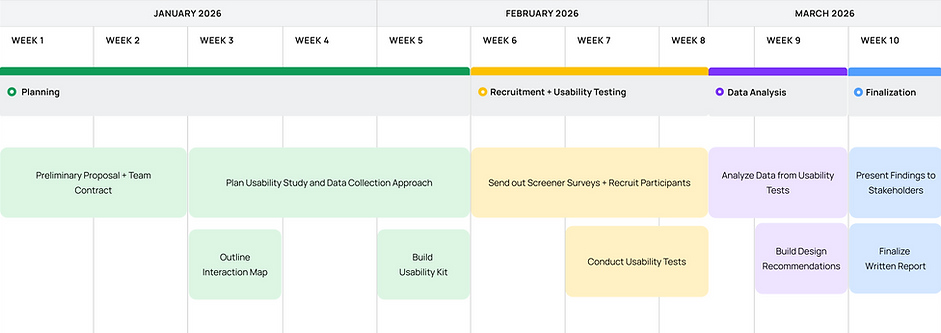
I worked alongside 3 classmates, reporting directly to 1 developer and 1 project manager at the USFS AirFire Research Team.
We had biweekly meetings with our sponsors to discuss research opportunities, stakeholder priorities, and updates on our usability testing. This project was a part of our HCDE 517: Usability Studies graduate course, led by Dr. Katya Cherukumilli.
.png)
PLANNING
Primary Users
The BlueSky Playground’s current users are scientists, technical specialists (THSP), and other professionals who work under intense pressure and time constraints in physically and mentally demanding environments. For our study, the participant pool will include the following groups of professionals:

Air Resource Advisors

Air Research Specialists

Firefighters
To produce insights informing a more successful design for highly trained and expert users, we assessed three main areas of the BlueSky Playground.
01 Data Entry
This involves technical interface terminology, discoverability and findability for specific settings, and understanding system status.
02 Workflow Management
This involves navigation and wayfinding between steps, awareness and tracking of progress, and recovering any work users want to resume.
03 Error Recovery
This involves recognizing when the model ran correctly, understanding why it failed and next steps, distinguishing between system bugs and user error, and finding support resources.
Research Questions
After meeting with our stakeholders, we identified four key research questions to address during our usability studies.
Can users easily navigate the stages and steps of the BlueSky Playground tool?
Are users aware of the tool’s capabilities and functions?
Do users struggle to understand the terminology used in the tool?
Are users able to locate the Run ID feature to save and reload unfinished runs?
Interaction Map
To better understand the BlueSky Playground (BSG) tool, our team conducted cognitive walkthroughs with the platform and outlined an interaction map of each page. This map highlights the general user flow of the BSG tool.

^ click map to view in detail
RECRUITMENT
Preliminary Screening Survey
Our team sent out a recruitment blurb and a screening survey to faculty and students within the UW Forestry Science Department as well as wildfire prevention organizations on campus. The screening survey asked users about their background and experience with wildfire and smoke dispersion tools.
Participant Profiles
For our study, the participant pool included four participants with a wide range of backgrounds in forestry science and related fields. Two participants were very familiar with the BlueSky framework, and all participants had used the BlueSky Playground within the last two years.

Participant 1
Environmental analyst familiar with wildfire behavior and smoke concepts but didn’t use them in their work
Participant 2
Former wildland firefighter in a new research position studying smoke produced by fire
Participant 3
Atmospheric sciences post-doc scholar with design experience for the Python version of the BlueSky framework
Participant 4
Fire ecologist with a background in wildland fuels, consumption and emissions modeling
USABILITY TEST
LOGISTICS
Moderated Usability Test
Our usability tests took place remotely using the video conferencing service Zoom. Two team members were present on each call. Informed consent was collected from the participant for them to take part in the study and be recorded.
OUTLINE
Participants ran a wildfire scenario to create a smoke prediction model.
For each task, the participant was asked to navigate through the different steps of the BlueSky Playground and input all relevant details to their domain or field.

DATA ANALYSIS
Affinity Mapping
After reviewing our notes, our team grouped main findings and quotes from our usability tests to find common themes and pain points.
.png)
Post-test survey results
Our survey used a likert scale to measure how users interacted with and felt about the BlueSky Playground tool. Likert Scale: 1 [strongly disagree] - 6 [strongly agree]

FINDINGS AND RECOMMENDATIONS
Severity Ratings
From our affinity mapping exercise, we categorized our usability issues by priority level from low to medium to high.
High Priority
Structural or technical issues that caused confusion or frustration and prevented users from completing their task
Medium Priority
Issues that caused users to slow down or pause their workflow, but didn’t stop them from completing their task
Low Priority
Cosmetic or minor design preferences expressed by individual users
FINDING #1: HIGH PRIORITY
Dispersion map troubleshooting

What Happened?
The Dispersion Results map initially failed to load for all participants.

4 out of 4
Participants encountered
issues troubleshooting even after reading the instructions.
Users assumed the dispersion page was broken.
“Even with the red text there, I would have just thought it was broken.” - P1
One participant thought their device was the issue.
“I think maybe because my monitor screen is very extended and curved so just the resolution is not as good.” - P3
Users found the troubleshooting instructions unclear.
“I thought that the resizing meant to make the window larger, not smaller”. - P4
FINDING #1
Design Recommendations

Investigate whether a backend or configuration issue is causing the map not to load.
4/4 failure rate indicates a likely systemic issue beyond user error.

*Note for Development Team
FINDING #2: HIGH PRIORITY
Saving the model Run ID
.png)
What Happened?
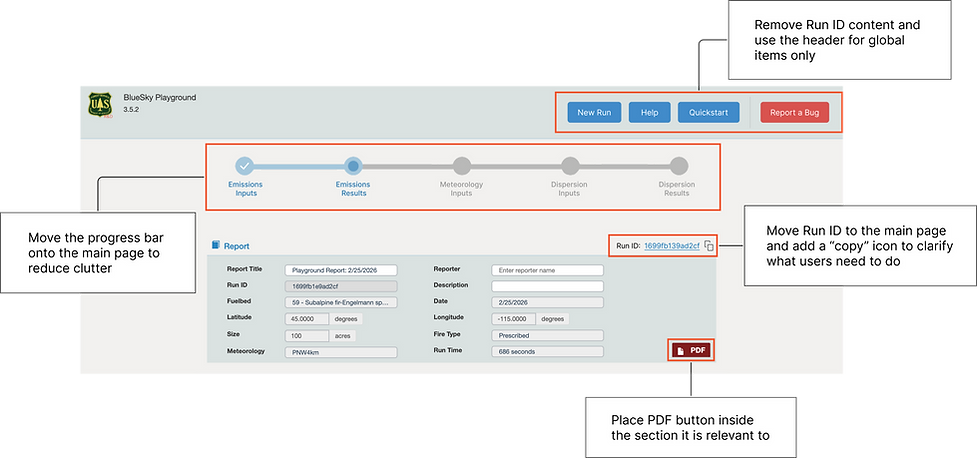
Participants were either unaware of or had very little experience with the Run ID feature.

*
3 out of 3
Participants had trouble locating and understanding the Run ID feature.
* 1 participant skipped this task
Users were confused by the inconsistent terminology.
“I guess… I will just replace the scenario ID here from my last run?” - P3
Users could not find the Run ID feature in the Help pages.
“Maybe the help guide has keywords?” - P2
The Run ID visual design was not intuitive for users.
“I don’t see a save button?” - P4
FINDING #2
Design Recommendations
Current

.png)
Proposed
FINDING #3: MEDIUM PRIORITY
Accessing contextual help

What Happened?
Participants had little to no interaction with the help features, even when faced with confusion or frustrations during the tasks.

1 out of 4
Participants looked for additional contextual information in the interface. None were successful in locating helpful information.
Users faced comprehension gaps with the terminology
“I don’t know what ‘run time’ means.” - P4
“And residual, I don’t know what that is”. - P1
One participant searched online rather than utilizing the help features
“I'm not sure what this means" [opens Google] - P3
Users wanted clarification on the content and its relevance to the tool
"...quite unclear on why it was broken out and how they were connected." - P1
FINDING #3
Design Recommendations

IMPACT
DELIVERY
Our team presented our findings and recommendations to the AirFire Research Team.
To conclude our project, we scheduled a call with the extended AirFire Research Team. Here, we were able to answer any questions the team had and discuss our findings in detail.
NEXT STEPS
The BlueSky Playground is expected to undergo a redesign, where our insights and recommendations will directly guide feature updates and design iterations.
As the first usability study conducted on the BlueSky Playground tool, we were able to surface key usability challenges and deliver a prioritized set of recommendations to the AirFire Research Team.
REFLECTION
Future Considerations
1. Start the recruitment process earlier
Even with the help of our sponsors, our team struggled to recruit enough participants for our usability tests. In hindsight, I would want to start our recruitment process earlier, which would have also broadened our range of users.
2. Strengthen domain knowledge before planning usability tests
Because BlueSky Playground is a highly domain-specific tool, I often struggled to fully understand its terminology and functions. I would invest more time speaking with our sponsors and exploring the tool before designing our usability tasks.
3. Conduct field testing
In future usability tests with the tool, it would be fun to observe users interact with the tool in real operational contexts (e.g., during an active burn). This would reveal pressures and time constraints that a controlled Zoom session can't capture.